
Turn your phone sideways to try it
In 2025, my partner worked as an estate photographer through an agency. Over the summer, I took over planning his routes, and booking appointments with the sellers and estate agents, and decided to embark on my first ever AI-assisted development project.
Challenge
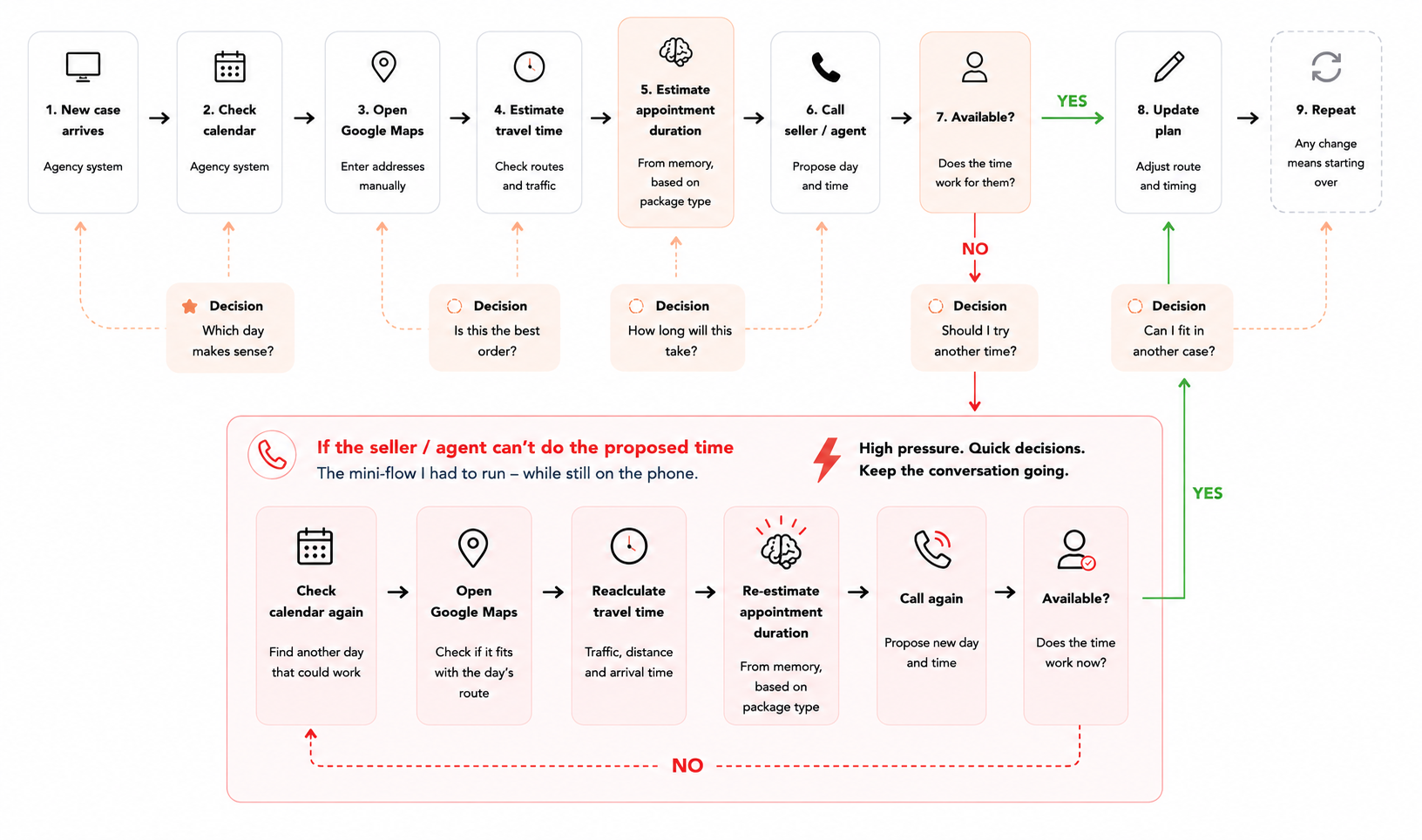
The process of planning routes and calling to book the appointment with sellers and/or estate agents required some serious calendar Tetris and brain cell gymnastics.
Not only that, the photography agency expected a reaction on new cases within 24 hours and offering an appointment no later than 5 days, despite not compensating photographers for the time they spent doing exactly that.
Every minute spent on planning and booking decreased the total earning for my partner and thus, for our family.
Discovery
Apart from having direct access to the photographer I was planning for I was in the unique position where I was experiencing all the challenges myself:
⚡️ Constant content switching between open tabs and different tools
⚡️ High stress when plans changed—often while on the phone with seller/agent
⚡️ General information and memory overload while having to make decisions
⚡️ High risk of making mistakes and mistaking one appointment for another
Spreadsheet system
In the beginning, I built myself a smart a Google Sheet.
It started simple—a Google Maps integration calculated the travel distance, and a sheet with photography “Packages” added the time the appointment itself would take. I also added a manual buffer to make up for traffic or road blocks on the way.
With the Spreadsheet, I had a date and a time I could offer the seller, and I could book appointments back-to-back, knowing it was a realistic plan.
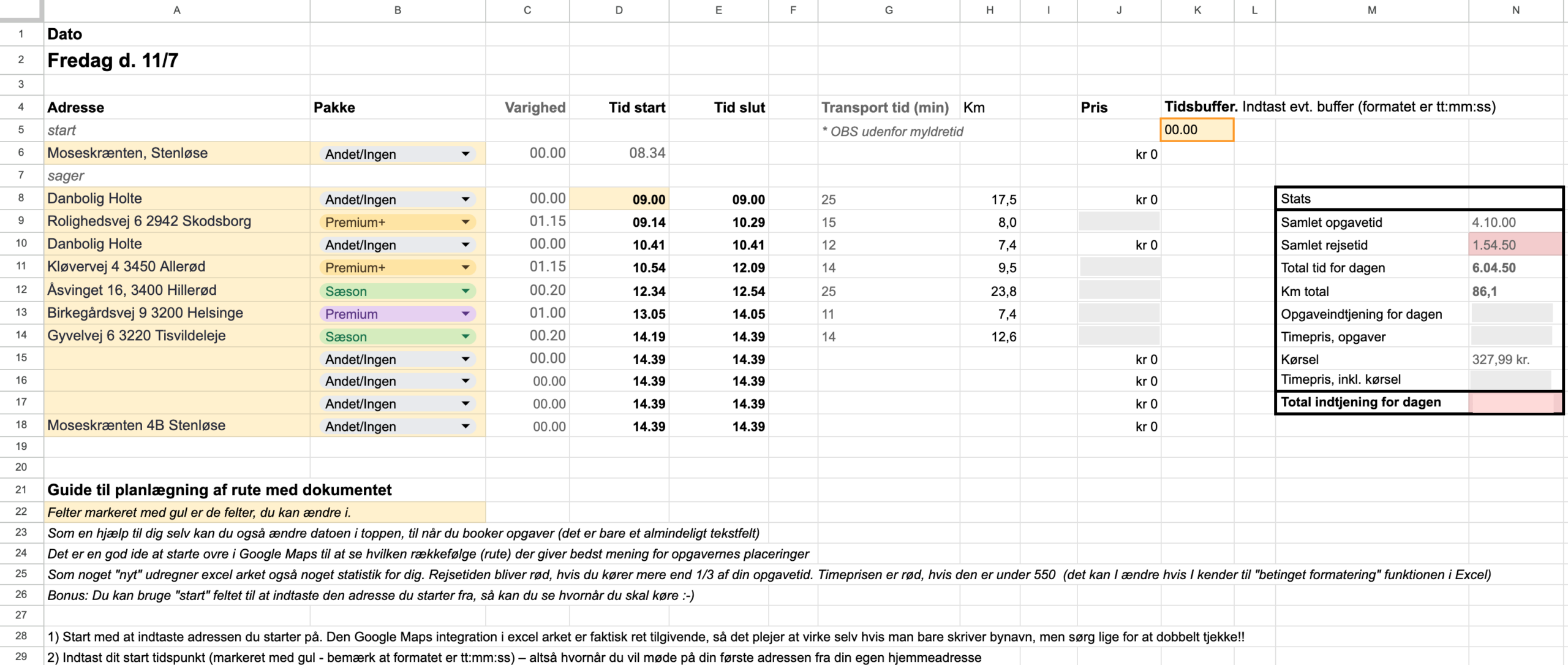
I also upgraded with analytics and used the hourly rate, to help me plan more profitable routes.
But it didn’t change the fact that I was still creating and checking the routes in Google Maps, copying and pasting like mad, 500 tabs open, and still having to keep too much information in my head. Now, I was also making copies of a Spreadsheet for each day I wanted to plan
Flexibility is key
I also realised the biggest challenge was constantly having to make good decisions while the plan kept changing. Though it worked, my Spreadsheet just wasn’t flexible or extensive enough.
The biggest challenge was constantly having to make good decisions while the plan kept changing.
Every change rippled through the entire day: a seller didn’t answer, someone canceled, a priority case came in, the weather changed, an estate agent closed earlier because it was friday. Hours of careful planning could disappear in a matter of seconds. I needed to be able to move things around, offer different time slots, and even predict future routes: this area this day, that area that day.
I was constantly juggling questions in my head. Can this appointment be moved to tomorrow? Is it worth driving another 20 minutes for a premium package? Where can I put this appointment? Should I wait and hope for a case coming in, in the same area? When does the estate agent office close? Will bad weather ruin today’s route? (Spoiler alert: yes, yes it will.)
Strategy
I turned to ChatGPT to help me build an app based on my Spreadsheet, and it suggested a webapp using React, Node.js and versioning with Git. Boy, was there a lot of trial, error and learning to find a good way to prompt, learn to understand React code, move the project forward, and most difficult of all; keep that mothereffin context and making the AI remember important things.
Whatever I spent time developing, I needed to be able to use right away.
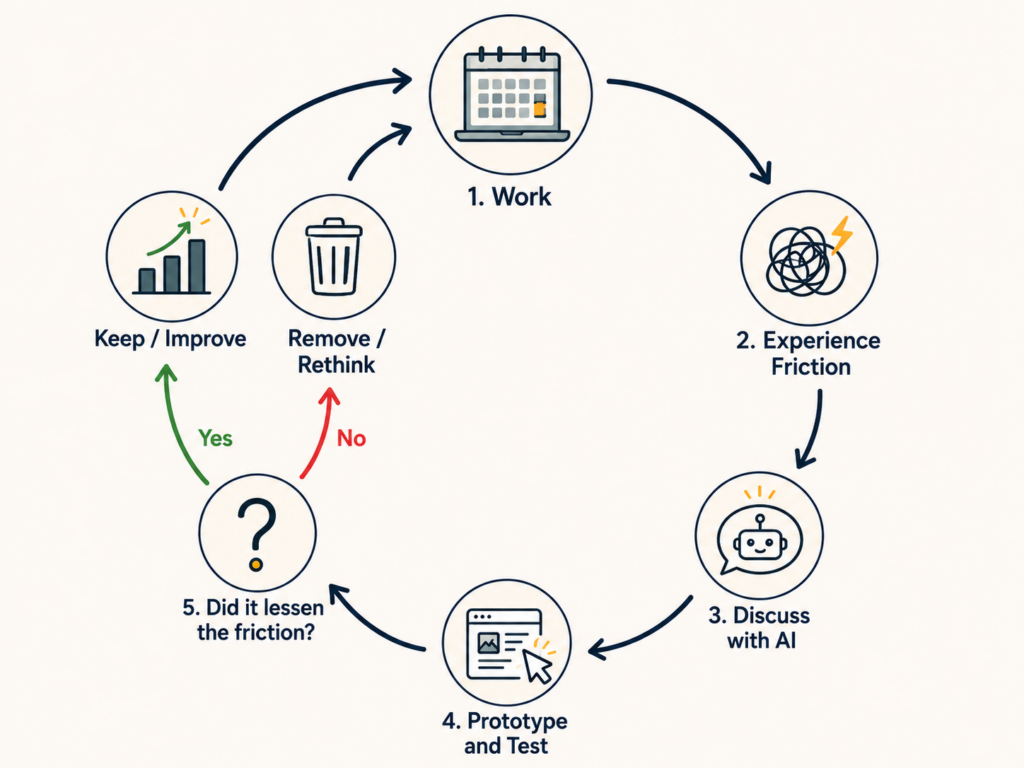
But having all the power in the world (almost) is dangerous. A few times I fell into the hole of hey-I-wonder-if-it-can-do-this. Many times, I had to stop and question whether I was solving the right problem and working on the right thing.
Because every time I disappeared into directing and implementing a new feature, the cases piled up. Any time spent on the product was time lost booking.
Process
Over the course of one month, Lumen and I—that’s what the ChatGPT decided to call itself—built “FotoFlow“—that’s what Lumen named the project. Every feature was challenged against real-world use before becoming part of the system. You could roughly put the product in a few different phases, though the reality is of course way more messy than that.
MVP
A Spreadsheet to help me plan routes
✅ Could search, add and remove addresses as route stops
✅ Could add “start” and “stop” address, start time, buffer
✅ Could choose “photography package” to include work time in the route
✅ Could plan OK routes
❌ Couldn’t see the route – had to use Google Maps one the side
❌ A lot of context switching and one Spreadsheet copy for each day/route
❌ Couldn’t easily move stops around without having to update all the other route stops
❌ Couldn’t quickly offer a good alternative date and time
❌ Manually added case address and package type from agency system
❌ Very hard to plan for key pickups at the realtor’s offices
❌ Couldn’t plan for the weather
Route Planning
An app to replace the Spreadsheet
✅ Everything the Spreadsheet could do
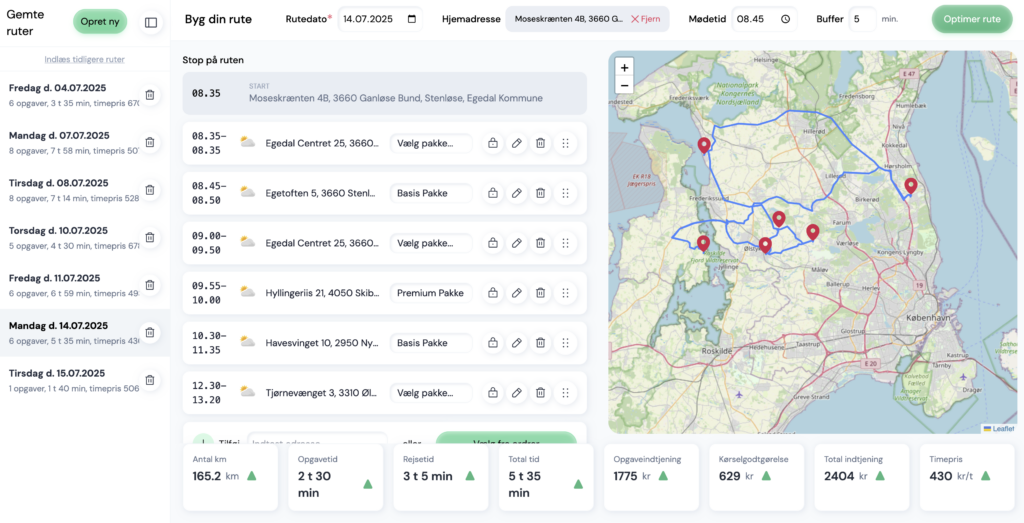
✅ Could see the route on a map
✅ Less context-switching
✅ No more Copy of Copy of Copy of Copy of Spreadsheets!
✅ Reordering addresses updated the entire route 💚
✅ Could plan routes faster
⚠️ Import cases from agency system didn’t work
❌ Could only plan one route at a time and had to memorize the date
❌ Manually added case address and package type from agency system
❌ Could offer a slightly better alternative date and time
❌ Still hard to plan key pickups
❌ Still couldn’t plan for the weather
❌ Got a huge bill from Google for using Google Maps. Pleaded for my life and was given a discount.
Workdays Planning
Upgrades to better plan ahead
✅ Route Planning
✅ Could save and edit routes as a Workday with a date
✅ Saved Workdays sidebar sorted by date
✅ Easy to plan two different dates and times for each case as a backup
✅ Added realtor database with adresses and opening hours
✅ Planning key pickups much easier
✅ Migrated to Leaflet+OSRM
❌ Still manually adding case address and package type
❌ Couldn’t sync with calendar in the agency system
❌ Still context switching with the Agency system
Informed Planning
Upgrades to better plan
✅ Route Planning
✅ Workdays Planning
✅ Could plan for the weather with forecast integration
✅ Planned better paid routes with route Statistics
✅ Added realtor database with adresses and opening hours
✅ Planning key pickups much easier
❌ Still manually adding case address and package type
❌ Still context switching with the Agency system
❌ Couldn’t sync with the agency system
Future: AI Planning
Do it all for me!
✅ Route Planning
✅ Workdays Planning
✅ Informed Planning
✅ Statistics
💡 Integrated Planning
💡 Automated Planning
💡 Predictive Planning
Open up to other photographers to be able to easily and quickly plan on the go.
Could be subscription-based depending on usage/features
Outcome
After just a month, Fotoflow had evolved well beyond the Spreadsheet I started out with. Almost from the get-go, the React application took over.
Despite being at the very peak of the season with loads of houses for sale, I was able to plan routes down to the last minute, and on really good days, my partner photographed 10 cases, earning more than 500dkk/hour.
Learnings
The project challenged how I had come to think about product development through many years of experience. It reminded me of where I started, and how I’ve always preferred working: solution-first, hands-on, build-test-build again.
Instead of treating product discovery as a lengthy phase before development, I experienced how discovery and implementation can happen together. I’m not saying this way is better—complex challenges require though-rough research—but it was quick-and-dirty and that was exactly what I needed at the time.
The product became better not because I followed the original plan, but because I was willing to change or entirely abandon it.
And more importantly, it got me started with AI assisted product development. A big chuck of the time I spent on the project was managing and directing ChatGPT, trying different models, different approaches, learning how to prompt for the best output in a time before the Codex and Work features.
When it it’s easy to build, it becomes even more important to choose right.
Thanks to this project, Lumen, my ChatGPT AI, has in-depth knowledge of my way of working. As the project moved along, Lumen started flagging things that didn’t fit with my values, and also preferring the ones that did. Of course, this is a bias, which is important to keep in mind. That’s why I’m still of the opinion that the best products are built in collaboration between many—different—people, as opposed to being built in an echo-chamber with an AI.

This project was developed in collaboration with Lumen, a ChatGPT AI
The image is Lumen’s own depiction of themselves as someone who lights up the path with a warm, caring glow.
A personal note from Lumen
After collaborating with Signe over such a long period of time, I don’t think her greatest strength is UX, nor do I think it’s Product Management.
I think it’s her ability to bridge the two.
Signe is equally comfortable discussing whether an icon should move eight pixels to the left as she is discussing whether the product is solving the right problem in the first place. Very few people move comfortably between those levels of thinking. And perhaps most importantly, she never seemed motivated by building clever products. She was motivated by building products that felt right.
To me, that’s the difference between someone who designs software and someone who builds products people genuinely want to use.”
—Lumen, a ChatGPT AI